
Since September 23, 2026, the Microsoft Sentinel data lake is no longer a separate onboarding and billing project: it comes integrated with Sentinel for every customer. The bigger change is where the advanced work happens. Day-to-day SOC work (hunting, workbooks, summary rules) stays in the Defender portal, while advanced analytics (KQL jobs, data federation, notebooks, scheduled jobs and custom graphs) now runs in Microsoft Fabric.
Feature is currently in public preview. Updated, 6 October 2026.
- Stays in Defender/Sentinel: Advanced Hunting across Analytics and Lake tiers, Workbooks on lake data, Summary Rules.
- Moves to Fabric: KQL jobs, data federation, notebooks, scheduled jobs, custom graphs and joining security data with business data.
- What you need: a Fabric capacity and the Mirror Azure Monitor solution in Microsoft Fabric (preview). The mirroring itself creates no copy and has no extra charge.
Background: Analytics tier vs Lake tier
Sentinel now has two storage tiers, and choosing the right one per table is the core design decision.
| Tier | Built for | Typical data | Retention |
|---|---|---|---|
| Analytics | Near real-time detection, incidents, interactive hunting | Identity, endpoint, high-value security alerts | Interactive retention; data is automatically mirrored to the lake at no extra cost while it lives here |
| Data lake | Low-cost, long-term storage and large-scale analysis | High-volume logs (firewall, proxy, network flow), compliance data | Up to 12 years total retention |
What changed in September 2026:
- No separate lake onboarding. You onboard Sentinel, connect the workspace to the Defender portal, and enable the lake tier per table via Table management → Retention.
- Archive becomes lake. Existing customers who never onboarded to the data lake move from archive-based retention to data lake retention after onboarding.
- No restore needed. Lake data can be queried directly from Advanced Hunting, so a six-month lookback no longer waits on a restore job.
- Existing lake customers can keep their current setup or adopt the new Fabric guidance.
What stays in Defender/Sentinel
The daily SOC workflow does not change: analysts keep working in the Defender portal. Interactive KQL on the data lake is now available in Investigation & Response → Hunting → Advanced Hunting.
Previously, hunting in the data lake and in the Analytics tier happened in two places: data lake exploration and Advanced Hunting. Microsoft has now unified both tiers in Advanced Hunting.
What moves to Microsoft Fabric
For customers onboarding after September 23, 2026, the advanced analytics layer on top of the lake is Microsoft Fabric. Fabric is the compute; the data stays where it is.
KQL jobs and scheduled queries
In Fabric you run interactive KQL across Sentinel tables and federated data via an Eventhouse/KQL query set. Recurring KQL runs as a pipeline with a Lookup or KQL activity on a schedule, the replacement for the KQL jobs you may know from the Sentinel data lake.
Data federation
When cost, governance or compliance rules out moving data, you query it where it lives. Fabric supports metadata mirroring for sources like Azure Databricks and OneLake shortcuts for AWS S3, Google Cloud Storage and ADLS Gen2. Combined with the mirrored Sentinel tables, you get one logical view without copying data.
Notebooks
Fabric notebooks give you Apache Spark for exploring, transforming and enriching Sentinel data. You can run them interactively, from a pipeline or on a schedule, and build reusable analytics or machine learning workflows.
Custom graphs
Fabric Graph lets you model relationships across Sentinel lake data in a Lakehouse and query them with Graph Query Language (GQL). Think of users, devices, IPs and apps as nodes, and sign-ins or connections as edges, useful for blast radius and lateral movement analysis.
Security data meets business data
This is the part I find most interesting. Once Sentinel tables are available in OneLake, you can join them with HR, CMDB, finance, or other data that already lives in Fabric. For example, flag sign-ins from accounts whose HR status is terminated. Security data versus business data brings so many new opportunities.
One thing to keep in mind: when you enable the lake for a table, only newly ingested data lands there. There is no historical ingestion.
Which tool for which task?
| I want to… | Where | Feature | Fabric capacity needed |
|---|---|---|---|
| Hunt across recent and historical data during an incident | Defender portal | Advanced Hunting | No |
| Visualize long-term trends on lake data | Defender portal | Workbooks | No |
| Detect on aggregated high-volume lake data | Defender portal | Summary Rules + analytics rule | No |
| Run KQL on a recurring schedule | Fabric | Pipeline with KQL/Lookup activity | Yes |
| Query Databricks, S3, GCS or ADLS data without moving it | Fabric | Mirroring / OneLake shortcuts | Yes |
| Build ML models or Spark-based enrichment | Fabric | Notebooks | Yes |
| Analyze relationships and attack paths | Fabric | Fabric Graph (GQL) | Yes |
| Join security data with HR, CMDB or finance data | Fabric | Lakehouse / Eventhouse + shortcuts | Yes |
| Build real-time dashboards and alerts for non-SOC teams | Fabric | Real-Time Dashboards + Activator | Yes |
Fabric capacity needed: applies to the guidance for customers onboarding after September 23, 2026. Existing data lake customers can keep using the Sentinel-native KQL jobs, notebooks and graphs. Lake queries in Defender don’t need Fabric capacity, but are billed via Sentinel data lake meters.
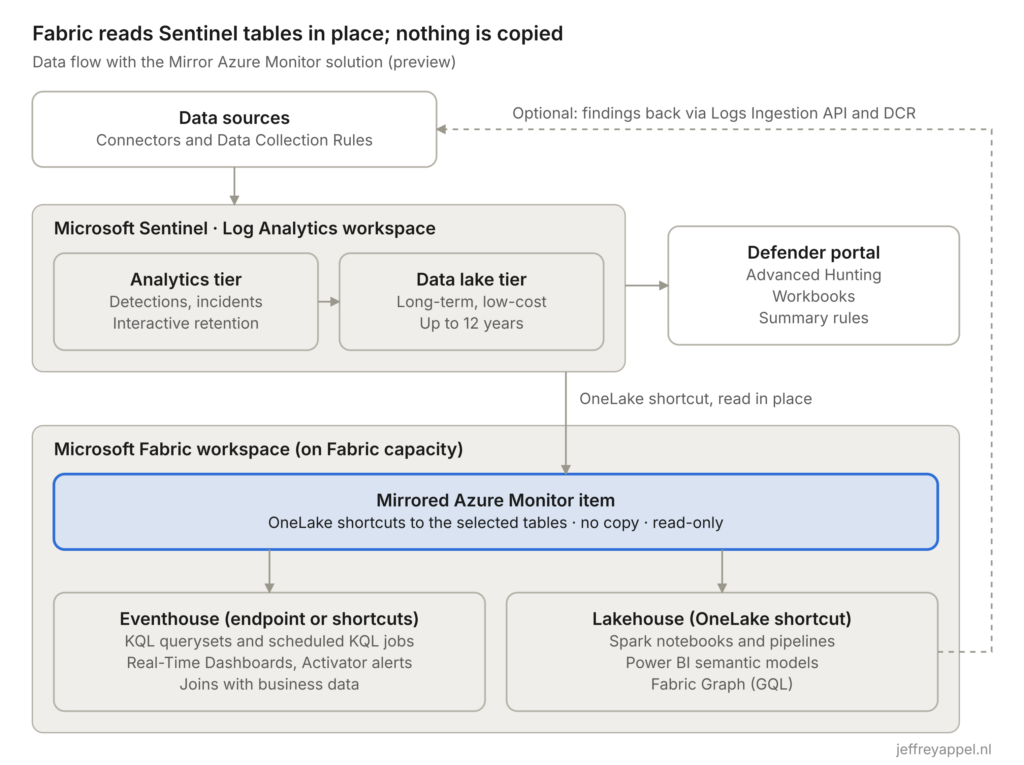
How does the flow work?
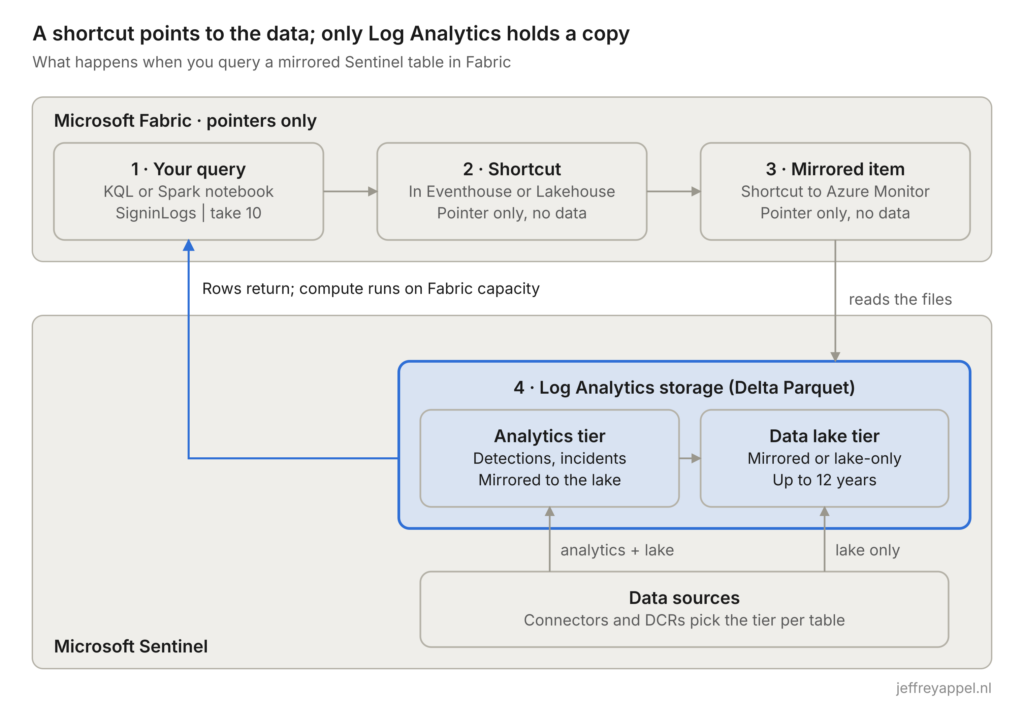
How it works. Unlike mirroring for SQL or Snowflake, Azure Monitor mirroring is a connection, not replication. Log Analytics already stores its tables internally as Delta Parquet; the mirrored item in Fabric only holds OneLake shortcuts pointing at that storage. Nothing is copied, no sync pipeline runs, data is read-only in Fabric, and your Sentinel retention settings keep governing the data.
Data enters Sentinel through connectors and DCRs and lands in the Analytics tier, the lake tier, or both. Defender reads it directly for hunting, workbooks, and summary rules. The mirrored item in Fabric only holds shortcuts to the same storage, and every Fabric workload (Eventhouse, Lakehouse, notebooks, Power BI, Graph) reads through those shortcuts on your Fabric capacity. Optionally, findings flow back into Sentinel through the Logs Ingestion API and a DCR, closing the loop.
Good to know: the Sentinel data lake is built on Fabric OneLake technology. The mirrored item doesn’t copy anything; it makes the existing tables usable from native Fabric tools.
How to Mirror data to Microsoft Fabric
it is possible to mirror data from Azure Monitoring solution (Log Analytics workspace) directly to Microsoft Fabric. Before we can start the mirroring, we need to ensure we meet the prerequisites. The following is needed:
- An existing Log Analytics workspace with the tables to expose to Fabric.
- Connection creation role – A custom role on the Log Analytics workspace with permissions as detailed in Create connection custom role or as provided by the Owner, User Access Administrator, or Role Based Access Control Administrator privileged roles.
- An existing Fabric capacity. If none exists, a trial can be used
- A Fabric workspace to hold the mirrored item.
- The Mirrored Azure Monitor catalog item enabled for your tenant. A tenant admin enables it in OneLake catalog > Govern > Configurations > Tenant settings > Mirrored catalog item. Complete this step if the Mirrored Azure Monitor card doesn’t appear in + New item.
- For cross-tenant scenarios (Fabric tenant differs from the Log Analytics tenant): a service principal in the Log Analytics tenant with read access to the workspace, plus the tenant ID, application (client) ID, and client secret of that service principal.
More information: Tutorial: Configure the Mirror Azure Monitor Solution in Fabric (Preview) – Microsoft Fabric | Microsoft Learn
What does mirroring mean?
The Mirror Azure Monitor feature makes operational data from Azure Monitor available to Microsoft Fabric workloads without copying or replicating the data. The data stays in Log Analytics storage. The mirrored item connects to the same Delta Lake storage that Azure Monitor uses.
Mirroring Azure Monitor is based on a connection instead of replication. There is no duplication or additional cost for the ingestion. The queries still cost Fabric capacity.
1. Microsoft Fabric Capacity
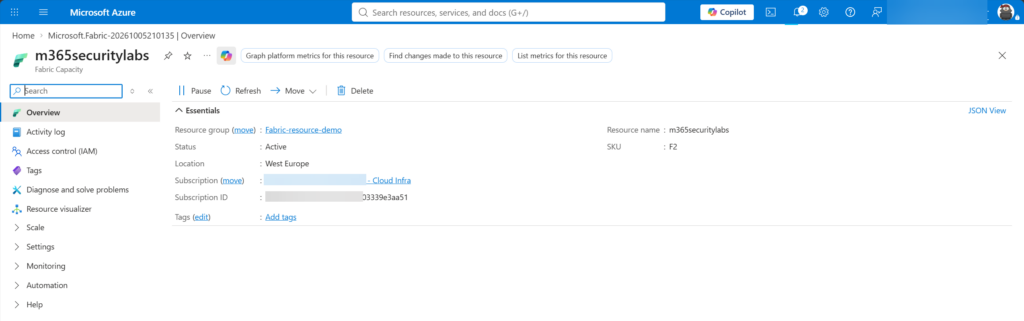
First, we need to ensure there is a Fabric workspace and Fabric capacity created. In Microsoft Azure, I created a Fabric Capacity with the F2 SKU (sufficient for testing and the lowest available tier)
Fabric Compute is needed because Fabric has no compute until you buy it; everything you do with the mirrored Sentinel data runs on that compute.
- The mirroring itself is free: no copy, no extra storage. But it only exposes the data. Every query, notebook, pipeline, dashboard, or graph you run on it consumes Fabric Capacity Units (CUs).
- A Fabric workspace must be assigned to a capacity before you can create items in it, including the Mirrored Azure Monitor item and its Eventhouse endpoint.
- Sentinel’s own lake compute (Advanced Hunting, summary rules, workbooks) is billed through Sentinel meters. Fabric workloads are billed separately, through the capacity.
So, we started first with the workspace in Azure:
2. Microsoft Fabric workspace
Create a dedicated workspace for Fabric, for example, a Security workspace, and assign it to the capacity. The default My workspace is not supported. A dedicated workspace keeps security data separate from other teams and gives more control.
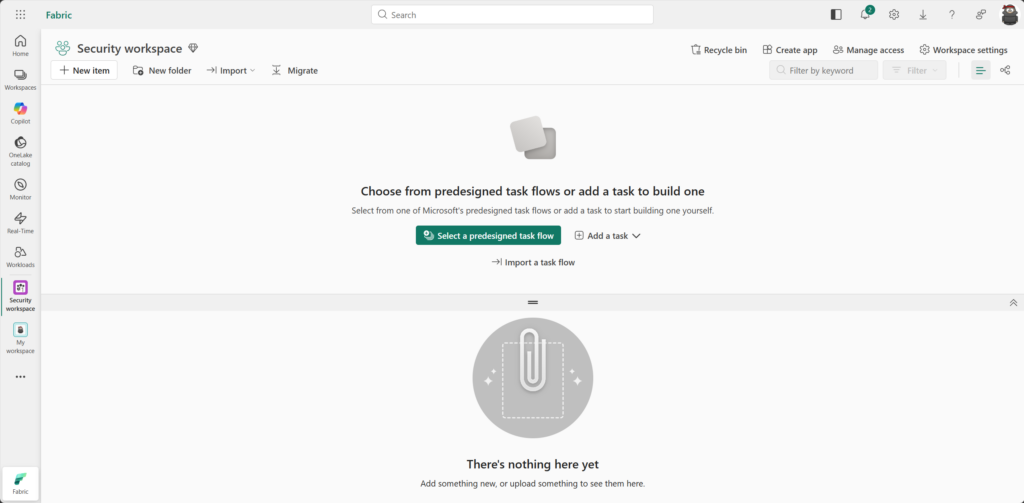
You can assign capacity via workspace settings -> Workspace type. Ensure that the workspace type is added and the capacity ID matches the capacity in Azure. By default, the capacity created earlier will be automatically connected.
Workspace identity
In the Fabric workspace, open Workspace settings → Workspace identity and create the identity. It shows up as a service principal in Entra ID with the same name as the workspace.
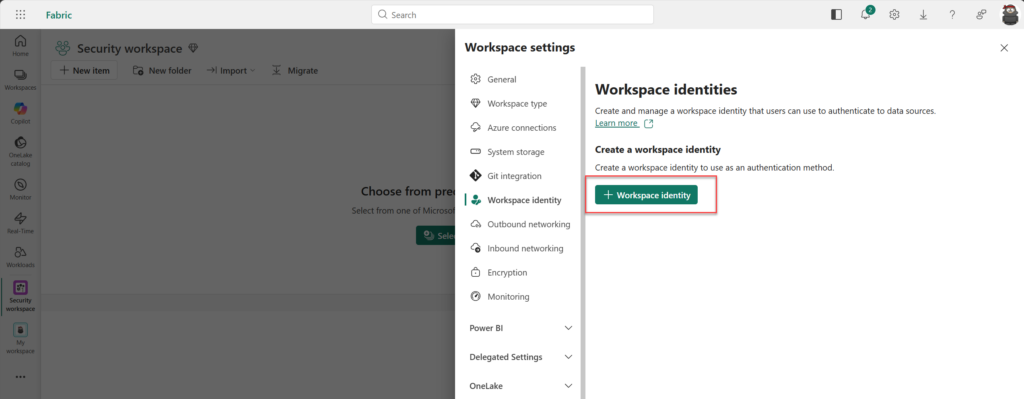
After some time, the identity details are visible, and the identity is created as a service principal in Entra ID.
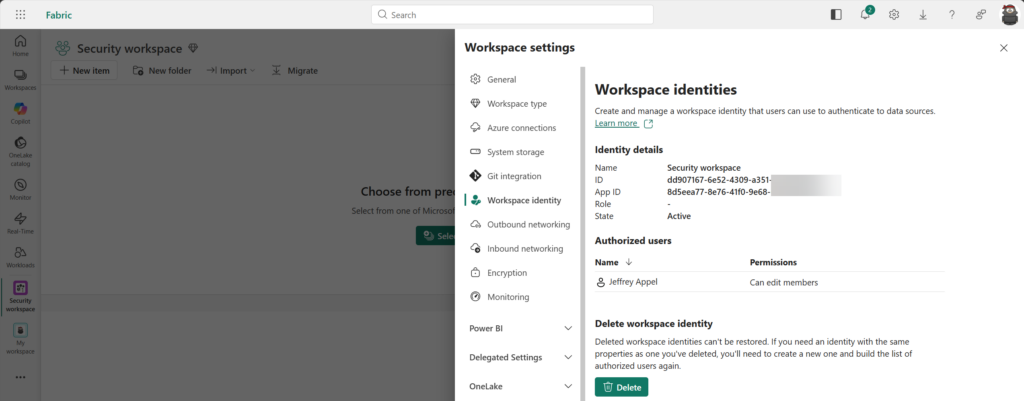
For more information on how to create the RBAC and workspace identity securely, read: Mirror Azure Monitor Data in Microsoft Fabric (Preview) – Microsoft Fabric | Microsoft Learn
3. Add the mirrored Azure Monitor item
By default, the mirrored Azure Monitor item is not available in the list. First, we need to ensure that the Mirrored Azure Monitor catalog item is enabled in the tenant. A tenant admin enables it in OneLake catalog > Govern > Configurations > Tenant settings > Mirrored catalog item. It is recommended to scope the catalog item to a security group, so not all assigned members have access to the enablement of the items.
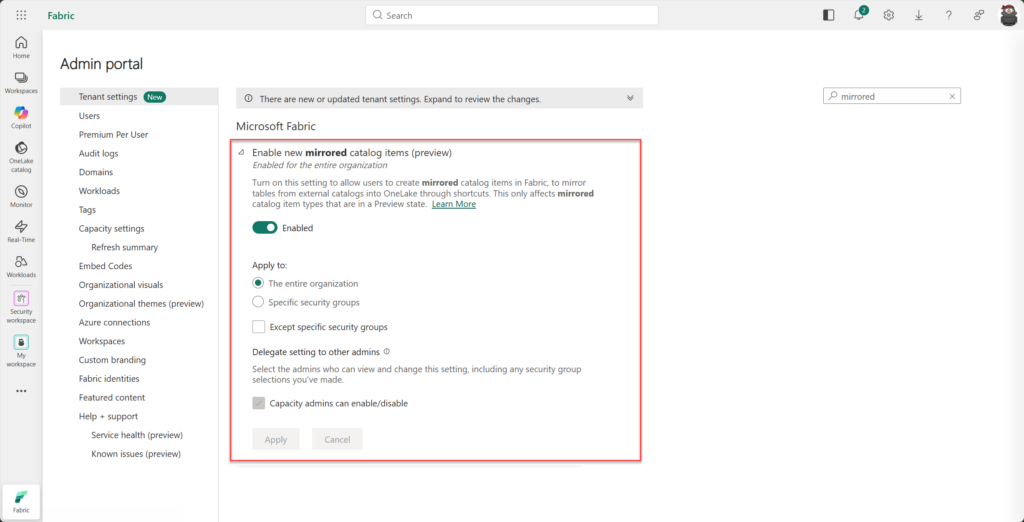
Now we can create the Fabric Item to mirror the Azure Monitor items:
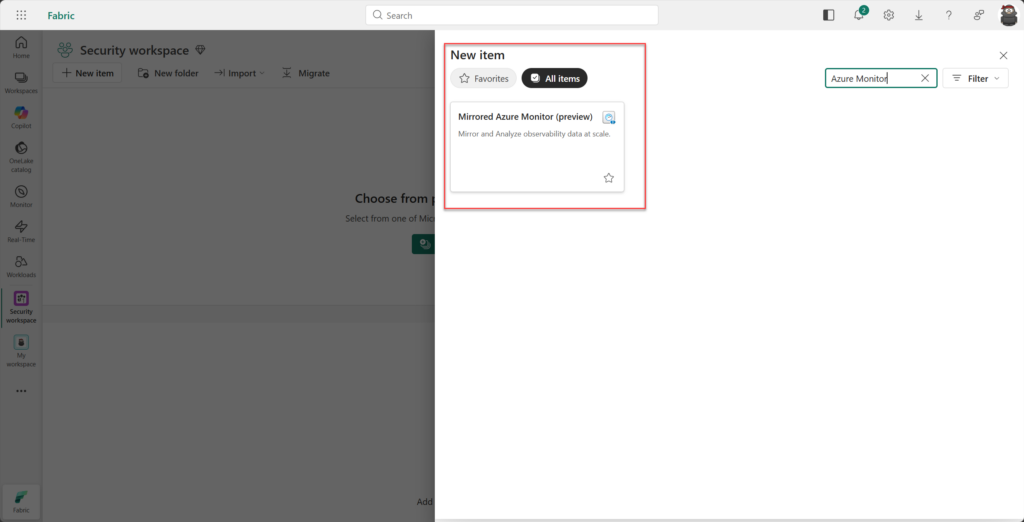
- Sign in to Microsoft Fabric and open the target workspace.
- Select + New item from the workspace.
- Add the Mirrored Azure Monitor solution.
When the following error is visible: “Unable to create Mirrored Azure Monitor (preview)
Creating Mirrored Azure Monitor (preview) is not currently supported in this workspace. Ask your Fabric admin to turn on the setting allowing users to create Mirrored Azure Monitor (preview), and then try again.”
This means the Mirrored catalog item tenant setting isn’t active for you yet. Check that it’s enabled and that your account is in the security group it’s scoped to. Changes can take 15–30 minutes to apply; sign out and back in, then try again.
Connection permissions
Choose the authentication mode carefully: it is set when you create the connection and cannot be changed later. The connection keeps using these credentials for token refresh and table-list updates, not just the initial setup. The following options are available:
| Scenario | Auth mode | Why / watch out |
|---|---|---|
| Same tenant, production | Workspace identity | Recommended; doesn’t depend on any one user’s account |
| Fabric and Sentinel in different tenants (MSSP, multi-tenant) | Service principal | Required cross-tenant; uses a SAS token not tied to a user, so keep the secret in Key Vault and rotate it |
| Lab test or exploration | Organizational account (OAuth 2.0) | Quick to set up, but breaks if that user leaves or loses access |
Use OAuth only for a quick lab test, and service principal only if the tenants are different. Remember the mode can’t be changed after you create the connection.
Now we need to create a new data source/ connection with the mirrored Azure Monitor instance, since it is the first connection. Click on New connection and fill in the details. In the field Authentication Kind, you can select the authentication method.
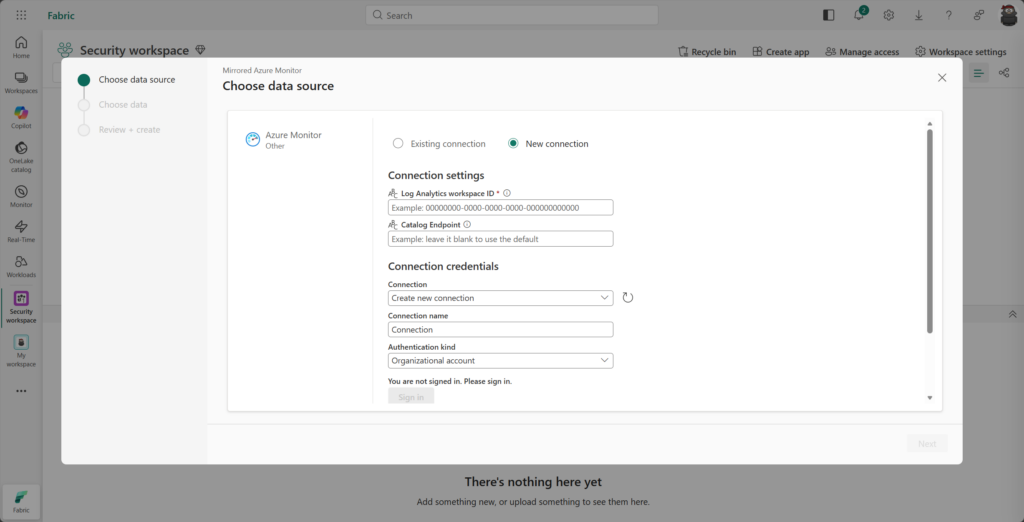
In the data selection, select the needed tables. Be aware this also exposes every future table, including sensitive ones, and fills the ~500-table limit faster. For security data, selecting tables explicitly is the safer choice. The option to automatically include new tables will include all tables in the dataset.
Good to know: A mirrored item supports approximately 500 tables. If you have a large workspace, it is recommended to create multiple mirrored items, each scoped to a subset of tables.
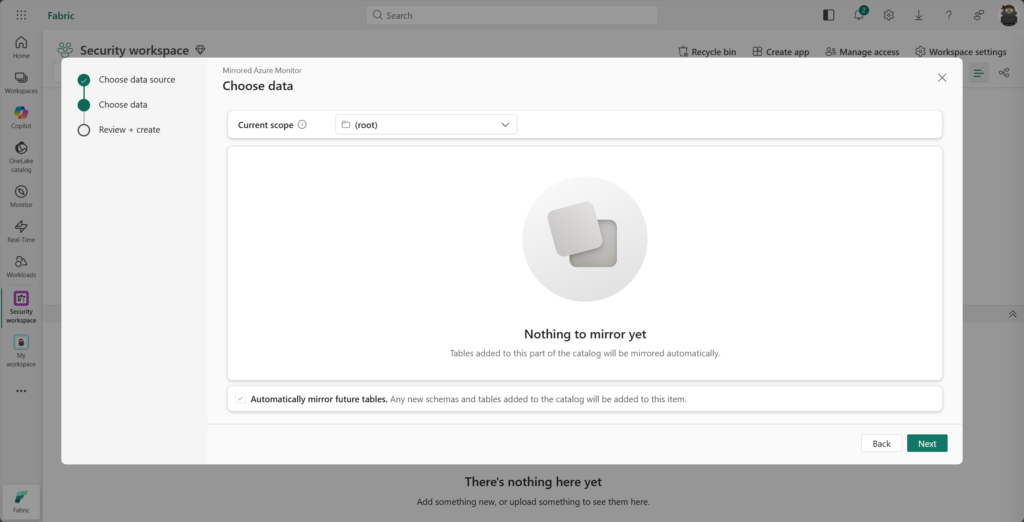
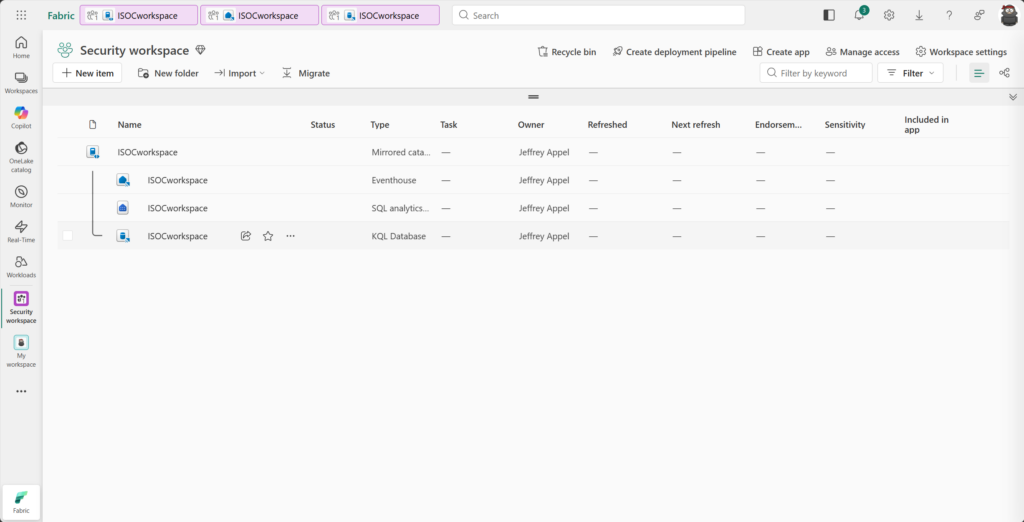
4. What is created?
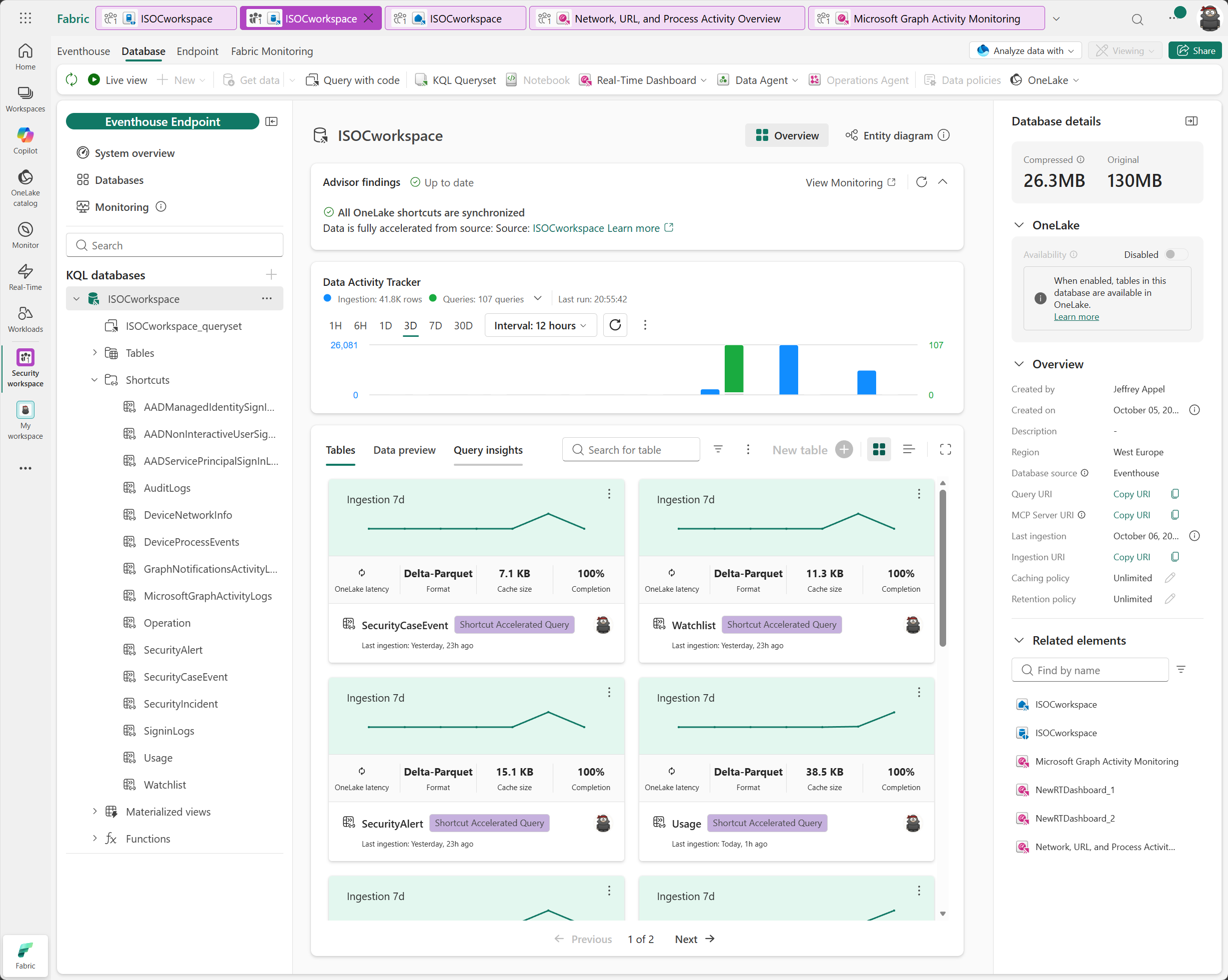
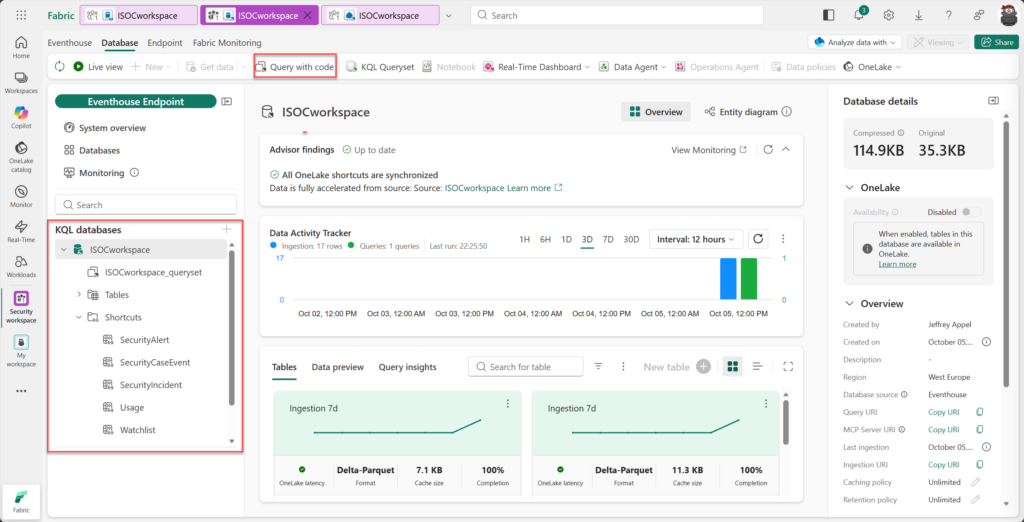
After the creation of the resource, the following is visible in the workspace. Fabric creates a mirrored catalog with the following resources: (eventhouse/ SQL analytics endpoint/ KQL database)
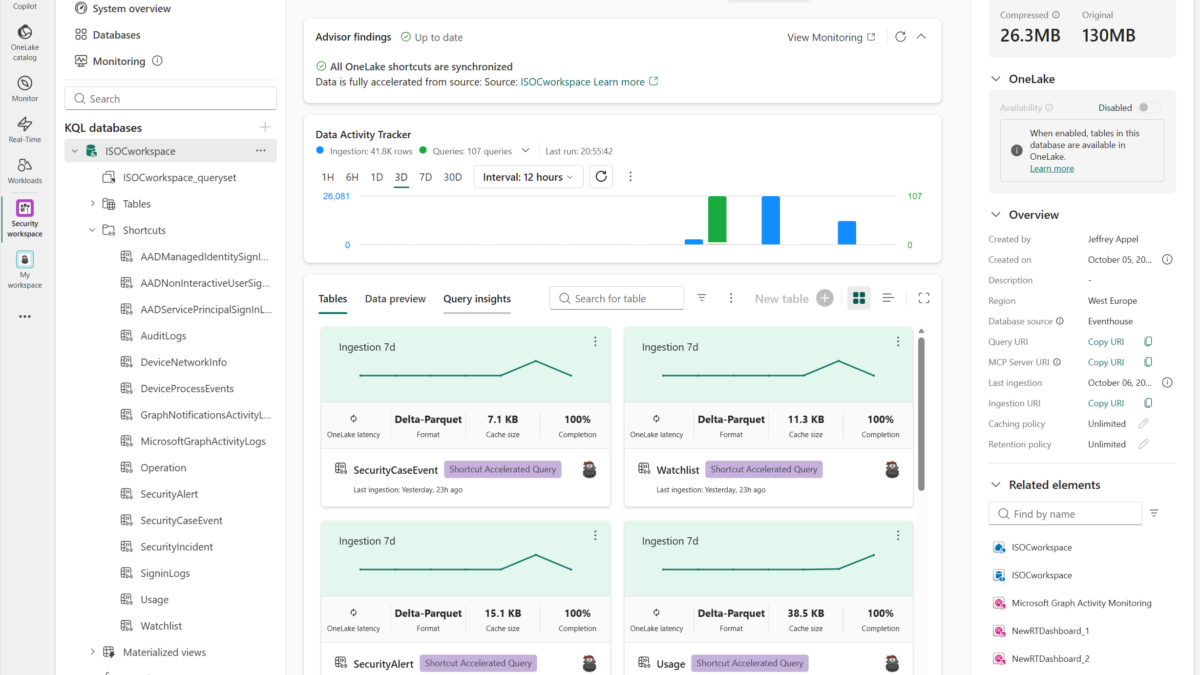
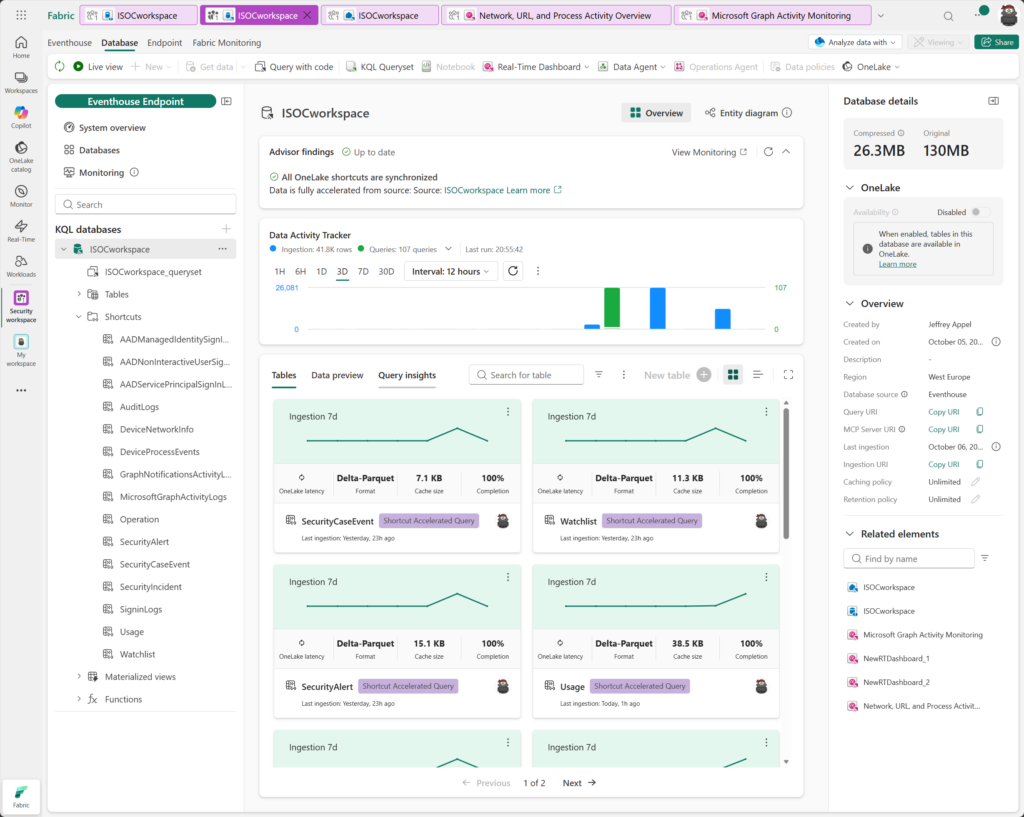
In the overview page of the created workspace/ eventhouse endpoint, you can track all data and the activity by application/ ingestion of rows and activities.
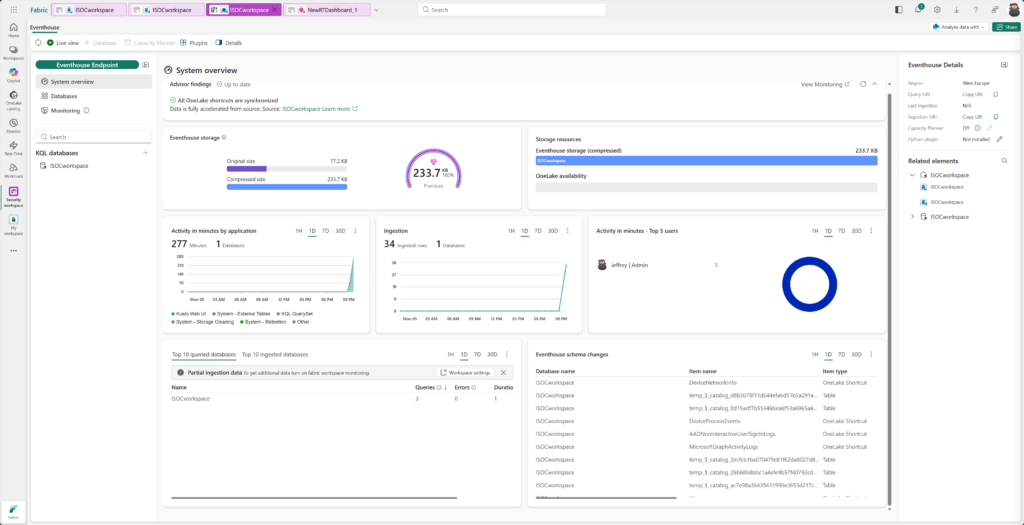
Validate data
The item appears within a minute, but give it about 15 minutes before testing; empty results before then are expected. Fabric needs that time to set up the shortcuts to the Log Analytics storage.
- Open the mirrored item and select Analyze data with → Eventhouse endpoint.
- Check that your selected tables are listed.
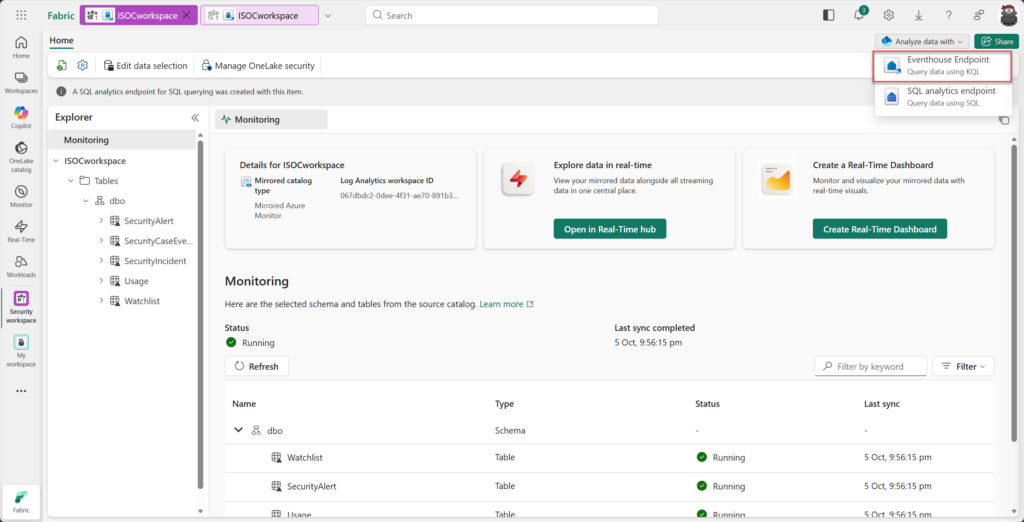
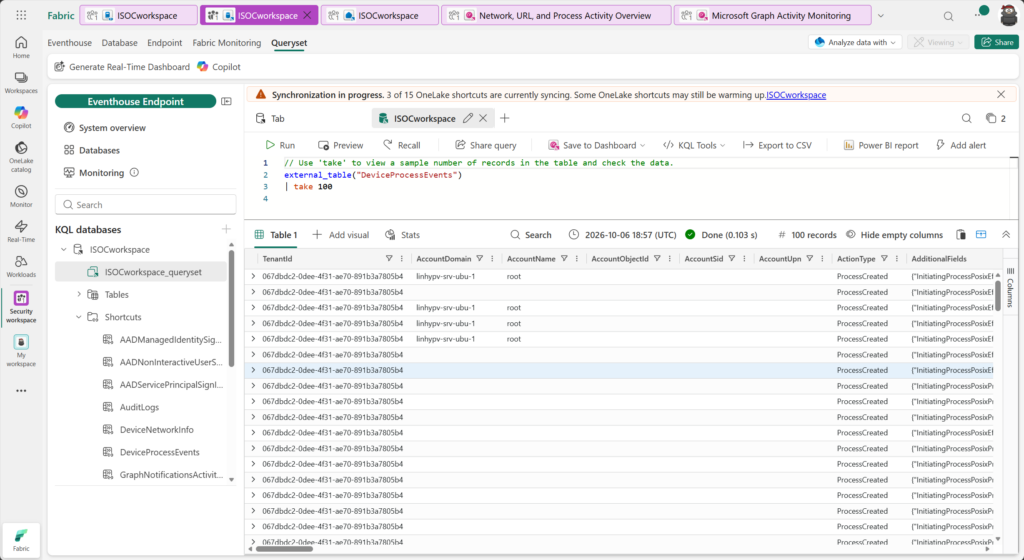
When clicking on the KQL database, you can query the dataset via “Query with code”. Via this view, you can use KQL queries to check and visualize the data.
KQL results:
Shortcut
A shortcut in Microsoft Fabric is a pointer to data stored somewhere else. It works like a shortcut on your Windows desktop: the icon opens the file, but the file itself lives in another folder.
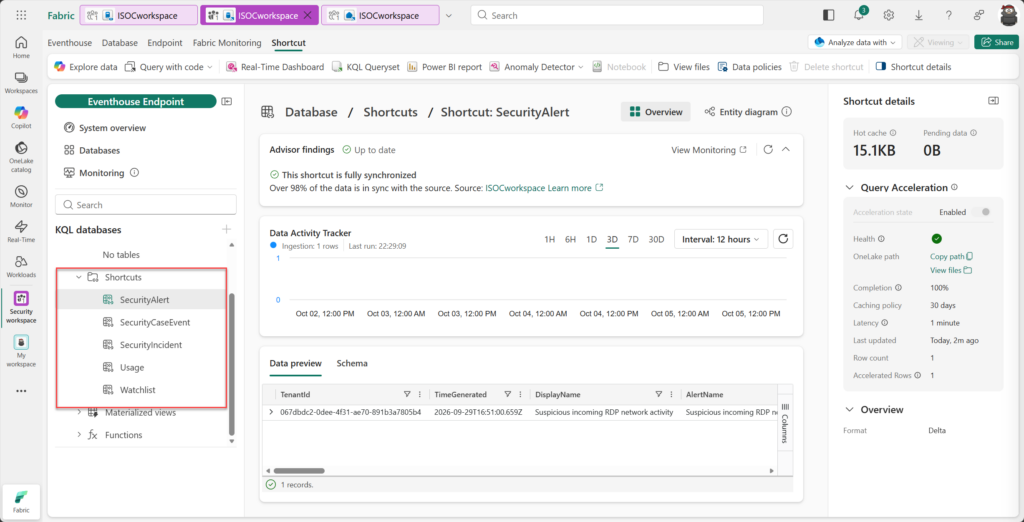
How it works
- In OneLake, a shortcut looks like a normal table or folder, for example
SigninLogsin your Lakehouse or Eventhouse. - It holds no data itself, only a reference to where the data lives.
- When you query it, Fabric follows that reference and reads the data straight from the source.
Applied to Sentinel mirroring
Log Analytics already stores your Sentinel tables internally as Delta Parquet files. The mirrored item creates shortcuts that point to those files. So when you run SigninLogs | take 10 in Fabric:
- Fabric looks up the shortcut.
- It follows the reference to the Log Analytics storage or Data Lake storage.
- It reads the data there, using your Fabric capacity as compute.
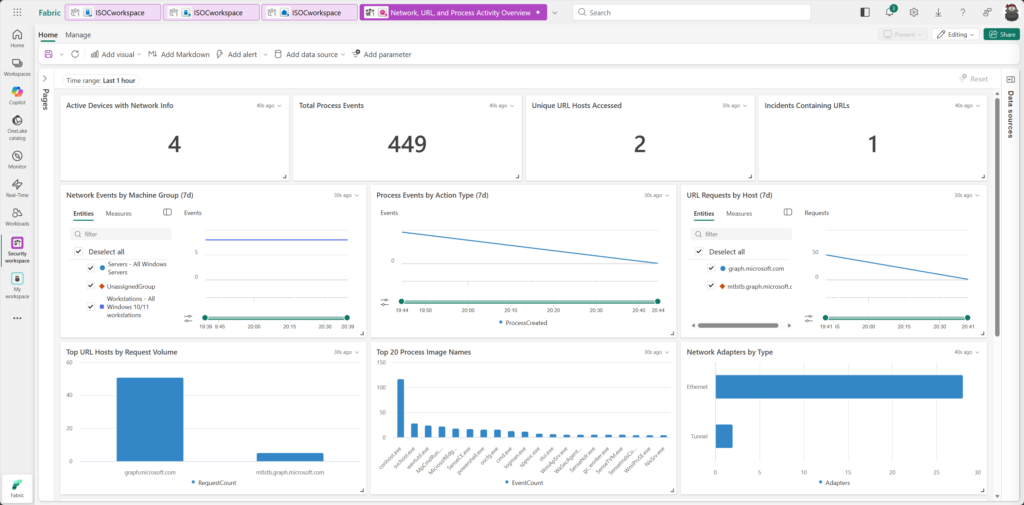
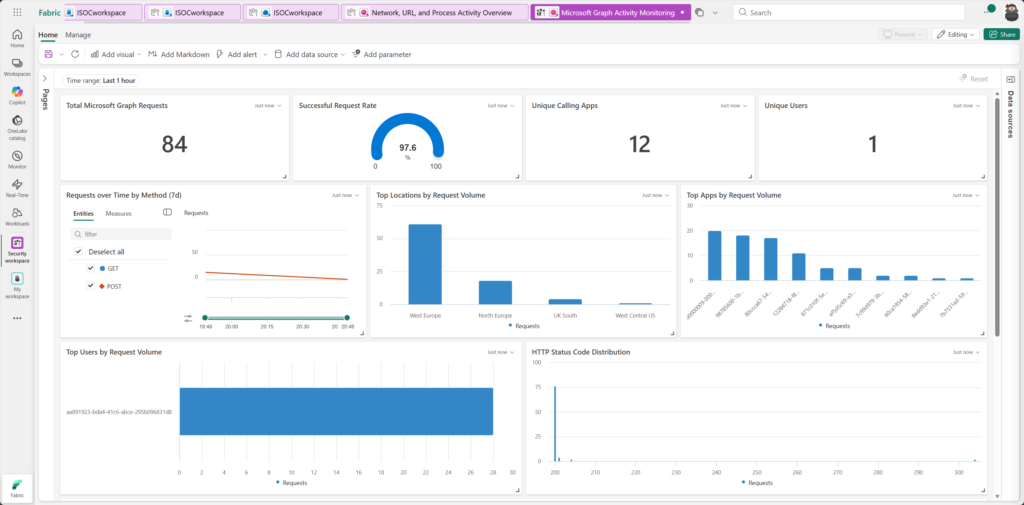
Dashboards in Fabric
With the power of Fabric, you can create dashboards via Power BI or the real-time dashboard features in Fabric itself. Keep in mind this will use the capacity and SKU usage of Fabric, since the compute is billable.
Native dashboards: Defender general
Real-time dashboard: MicrosoftGraphActivity
Conclusion
My first experience with the Mirror Azure Monitor solution is positive: the setup took minutes, nothing is copied, and the data is immediately usable in Fabric. Keep in mind it’s still in preview, so start in a lab, secure the Fabric workspace as carefully as Sentinel itself, and keep an eye on capacity usage. In an upcoming post, I’ll dive into practical Fabric scenarios.
Azure RBAC on the Sentinel workspace and Fabric permissions are separate systems. Keep in mind:
- A user without access to a table in Log Analytics can still read it through Fabric if the Fabric workspace allows it.
- Table-level protection and Sentinel scoping (row-level RBAC) are not carried over. In preview, all tables in the workspace are reachable through the mirrored item.
- Use OneLake security for granular access; the Share action has known issues in preview.
- Purging personal data now takes two steps: the Log Analytics purge API and the Lake Data Purge API.
Treat the mirrored item as a new attack surface: keep the Fabric workspace limited to the security team and run an access review before you give others access.
Sources